Version 0.8.0 is the biggest update to Obsidian Project Planner yet — a new cross-project view, a full cost tracking system, and a deep bug audit that squashed 23 issues across the codebase.
My Tasks View
The new My Tasks view gives you a single place to see what's on your plate across every project in your vault.
Today mode shows all tasks due today in a filterable table with inline checkboxes, priority/status pills, and a progress summary bar. Click any task to jump straight to its detail panel.
Week mode switches to an Outlook-style 7-day column layout (Monday–Sunday) with compact task cards, week navigation arrows, and a highlighted "today" column. Filters are shared between both modes — switch freely without losing context.
Open it from the header navigation (sun icon) or the command palette with "Open My Tasks."
Cost Tracking
You can now track costs at the task and project level.
Per-task cost supports two modes:
- Fixed — enter an estimated and actual cost directly
- Hourly — cost is automatically derived from effort hours × an hourly rate
Set a per-task rate override or let it fall back to the project default hourly rate, configurable in plugin settings alongside total budget and currency symbol.
Grid View gets two new toggleable columns — Est. Cost and Actual Cost — formatted with your chosen currency.
Dashboard now shows a Budget & Cost card with a progress bar that shifts from green to yellow (75%) to red (90%), plus KPI cards for Budget, Estimated, Actual, Remaining, and an over-budget task count.
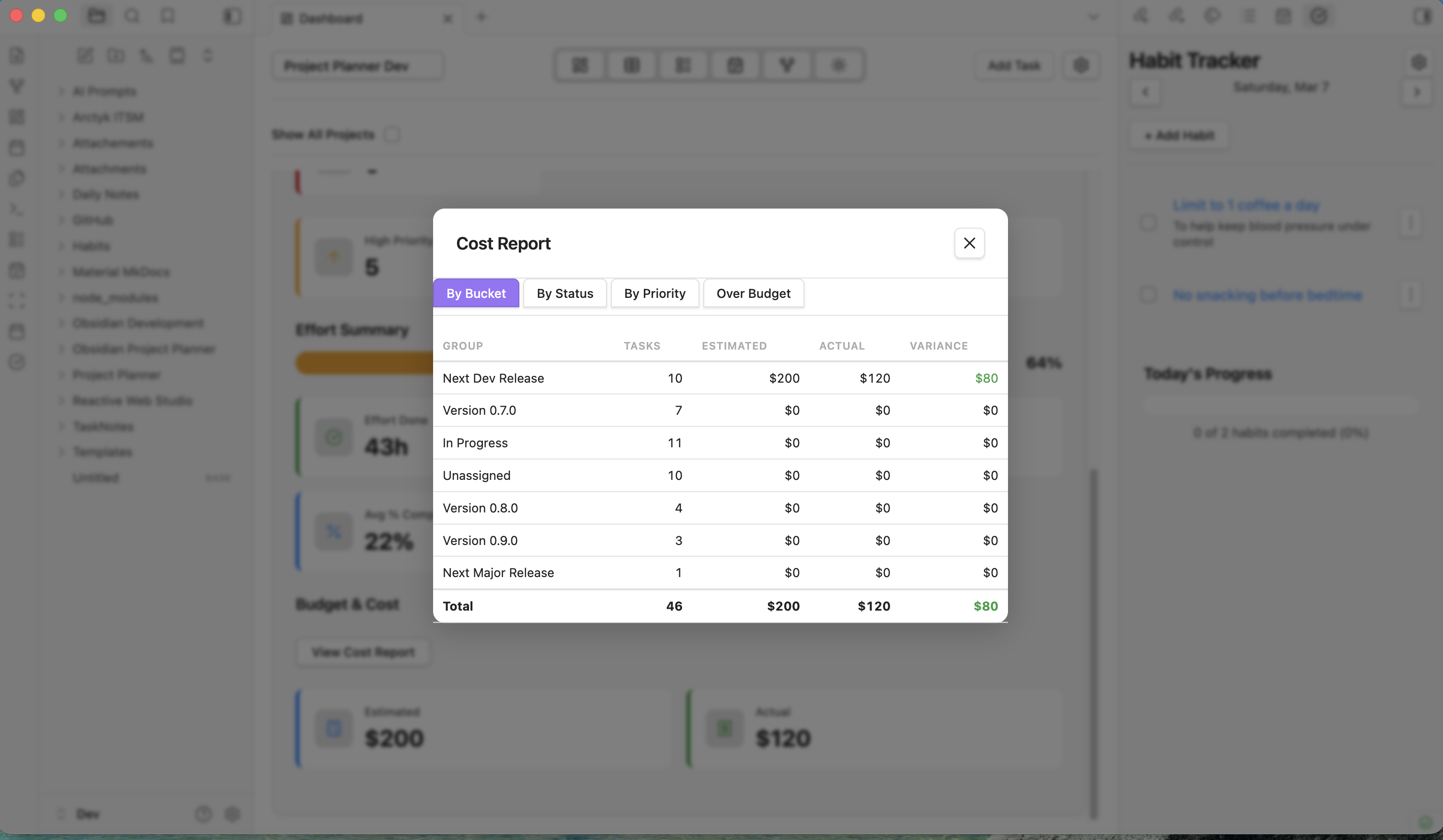
Hit "View Cost Report" to open a tabbed modal with breakdowns by bucket, status, or priority — each with a totals row and color-coded variance — plus a dedicated over-budget task list.
Parent tasks automatically roll up cost data from their children, just like effort and dates already do.
All cost fields are optional. Existing vaults load without any migration.
23 Bug Fixes
We did a comprehensive audit of every view and utility in the plugin. Highlights:
- GanttView UTC date shift — dates no longer jump a day near midnight
- Cross-project task edits — My Tasks updates now persist correctly across projects
- Parent drag in Grid — nested children are properly collected during drag operations
- Checkbox status sync — BoardView and GanttView checkboxes now update both completed and status in one write
- DashboardView modal leak — modals are properly cleaned up on view close and dismissed with Escape
- DependencyGraphView HiDPI — canvas renders crisply on Retina displays
- DailyNoteTaskScanner batching — file saves reduced from per-line to per-scan for better performance
- GridView duration — same-day start/due now correctly shows "1 day" instead of "0 days"
- Plus 15 more fixes across TaskDetailView, uuid generation, scroll sync, listener cleanup, and column rendering
The full list is in the changelog.
Other Changes
- Grid View column menu now shows native checkmark indicators for visible columns
- TaskStore.rollUpParentFields()aggregates cost data from children
- PlannerTask and PlannerProject interfaces extended with cost/budget fields
What's Next
We're already planning the next round of features. Join the conversation on Discord or GitHub Discussions — your feedback shapes what comes next.
Download: Install or update from the BRAT plugin, or grab the release from GitHub.