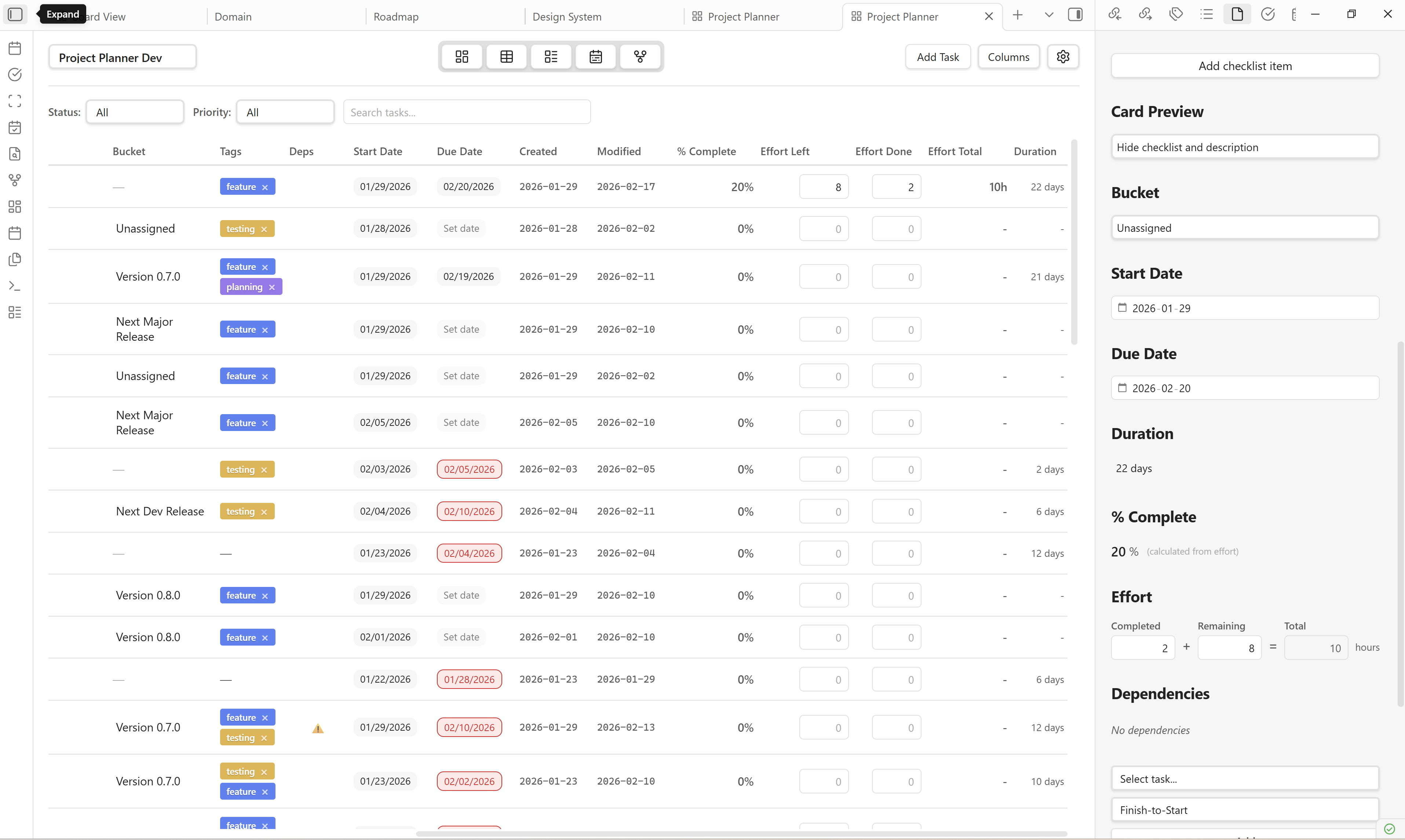
One of the most requested features for Project Planner is task effort tracking. While I'm actively working on implementing this feature, I wanted to share what task effort tracking is and how it will transform project management in Obsidian.
What is Task Effort?
Task effort refers to the amount of work time required to complete a task, typically measured in hours. Unlike task duration (which measures calendar time between start and end dates), effort represents the actual person-hours invested in getting work done.
For example, task might have a duration of 5 days (Monday to Friday) but only require 8 hours of effort (actual working time).
Understanding the distinction between duration and effort is crucial for accurate project planning, resource allocation, and workload management.
How Task Effort Works in Project Planner
Following the Microsoft Premium Planner model, task effort in Project Planner will be split into three interconnected fields:
Effort Completed
The number of hours already spent working on the task. As team members log their time, this value increases, giving you real-time visibility into how much work has been invested.
Effort Remaining
The estimated hours still needed to complete the task. This is a forward-looking metric that helps teams understand what's left to do and adjust plans accordingly.
Effort Total
The sum of completed and remaining effort (`Total = Completed + Remaining`). This is automatically calculated and represents the overall work required for the the task.
Smart Time Tracking
The beauty of this three-fold system is its intelligence. When you log completed effort, the system automatically:
- Adds those hours to Effort Completed
- Subtracts equivalent hours from Effort Remaining
- Recalculates Effort Total
This dynamic relationship gives you an accurate, up-to-date picture of task progress without manual recalculation.
Where You'll Track Effort
Task effort will be configurable in two key places:
Task Details Panel
When you open a task, you'll find dedicated effort fields where you can log completed hours and update remaining estimates.
Grid View
Effort metrics will be visible directly in the hierarchical task grid, allowing you to see effort data alongside status, priority, dates, and other task attributes - perfect for quick scans and bulk updates.
Dashboard KPIs and Progress Tracking
Perhaps the most powerful aspect of task effort tracking is how it integrates with Project Planner's Dashboard view. Effort metrics will be aggregated into KPIs that show:
- Total effort across all tasks
- Percentage of effort completed vs. remaining
- Effort burn-down over time
- Resource allocation insights
Additionally, the % Complete metric will use effort data (Completed ÷ Total) to display accurate progress percentages, giving you a data-driven view of how close tasks are to completion.
Task Duration: The Companion Feature
Alongside effort tracking, I'm also implementing task duration - the calendar time between start and end dates. This is calculated as:
Duration = Due Date - Start Date (in days)
By combining duration with effort, you'll be able to:
- Identify tasks with long durations but low effort (waiting periods)
- Spot tasks with high effort compressed into short durations (resource bottlenecks)
- Balance workloads more effectively across your team
Built for Obsidian
True to Project Planner's philosophy, task effort data will be stored in markdown files with YAML frontmatter, ensuring your project data remains portable, searchable, and future-proof. Task effort fields will synchronize bidirectionally between the plugin views and your vault notes.
---
title: Implement authentication system
status: In Progress
effortCompleted: 6
effortRemaining: 4
effortTotal: 10
percentComplete: 60
---
Coming Soon
I'm actively developing task effort tracking and can't wait to bring this powerful capability to Project Planner. This feature will make it easier than ever to manage complex projects, track capacity, and deliver work on time.
Stay tuned for updates, and as always, I welcome your feedback and suggestions!